
In this article
- 01What are Shopify quantity breaks?
- 02Start with contribution margin
- 03Choose thresholds from buying behavior
- 04Use operational savings to fund the offer
- 05How to set profitable Shopify quantity breaks
- 06Keep the offer easy to understand
- 07Protect the promotion with guardrails
- 08Measure profit, not only AOV
- 09Launch your first quantity-break test
- 10Frequently asked questions
Shopify quantity breaks reward customers for buying more units, but a larger cart is not automatically a more profitable cart. A discount can raise average order value while reducing contribution margin, increasing shipping cost or pulling future purchases into one order.
The goal is to create tiers that reflect real customer demand and real unit economics—not simply copy “buy more, save more” percentages from another store.
What are Shopify quantity breaks?
Quantity breaks apply different pricing or discounts at defined unit thresholds. For example:
- 1 unit: regular price
- 2 units: 5% off
- 4 units: 10% off
- 8 units: 15% off
The discount may apply to one product, selected products, variants or the cart. The best structure depends on how people consume the product and how your costs change with order size.
Start with contribution margin
Gross margin alone can miss important variable costs. Estimate the contribution from each tier after subtracting:
- Cost of goods
- Discount
- Payment fees
- Pick and pack cost
- Packaging
- Shipping subsidy
- Expected returns or damage
A simple planning formula is:
Contribution per order = revenue after discount − variable product, payment, fulfillment and shipping costs
Build a small table for every proposed tier. Reject any tier that creates unacceptable contribution unless there is a deliberate, measurable reason to use it.
Choose thresholds from buying behavior
Review order history. If most customers buy one unit and a meaningful group buys three, a tier at three may feel natural. A threshold at ten may be irrelevant unless buyers purchase for teams, events or resale.
Also consider consumption. Encouraging six months of supply can delay the next order and expose the product to storage or expiration issues.
Use operational savings to fund the offer
Some costs do not rise linearly. One six-unit shipment may require less packaging and handling than six separate orders. Quantity breaks are strongest when part of that efficiency can be shared with the customer.
Check weight bands carefully. A threshold can also push an order into a more expensive shipping bracket and erase the expected saving.
How to set profitable Shopify quantity breaks
- 1.Pick a product with natural multi-unit demand.
- 2.Calculate contribution at the regular price.
- 3.Model two or three meaningful thresholds.
- 4.Add shipping and fulfillment changes at each tier.
- 5.Set a margin floor that the promotion cannot cross.
- 6.Define discount stacking rules.
- 7.Run a limited test and compare incremental profit.
Keep the offer easy to understand
Three tiers are often easier to scan than six. Show quantity, savings and resulting price consistently. If the discount applies automatically, say so. If customers must enter a code, put the code next to the offer.
Avoid mixing unit price, percentage off and total savings in a way that makes comparison difficult. Pick the measure most useful to the customer and make the total visible before checkout.
Protect the promotion with guardrails
- Exclude low-margin products when needed.
- Set maximum quantities for scarce stock.
- Prevent unintended stacking with other discounts.
- Define whether variants can be mixed within a tier.
- Account for subscription and wholesale pricing.
- Test returns from partially discounted orders.
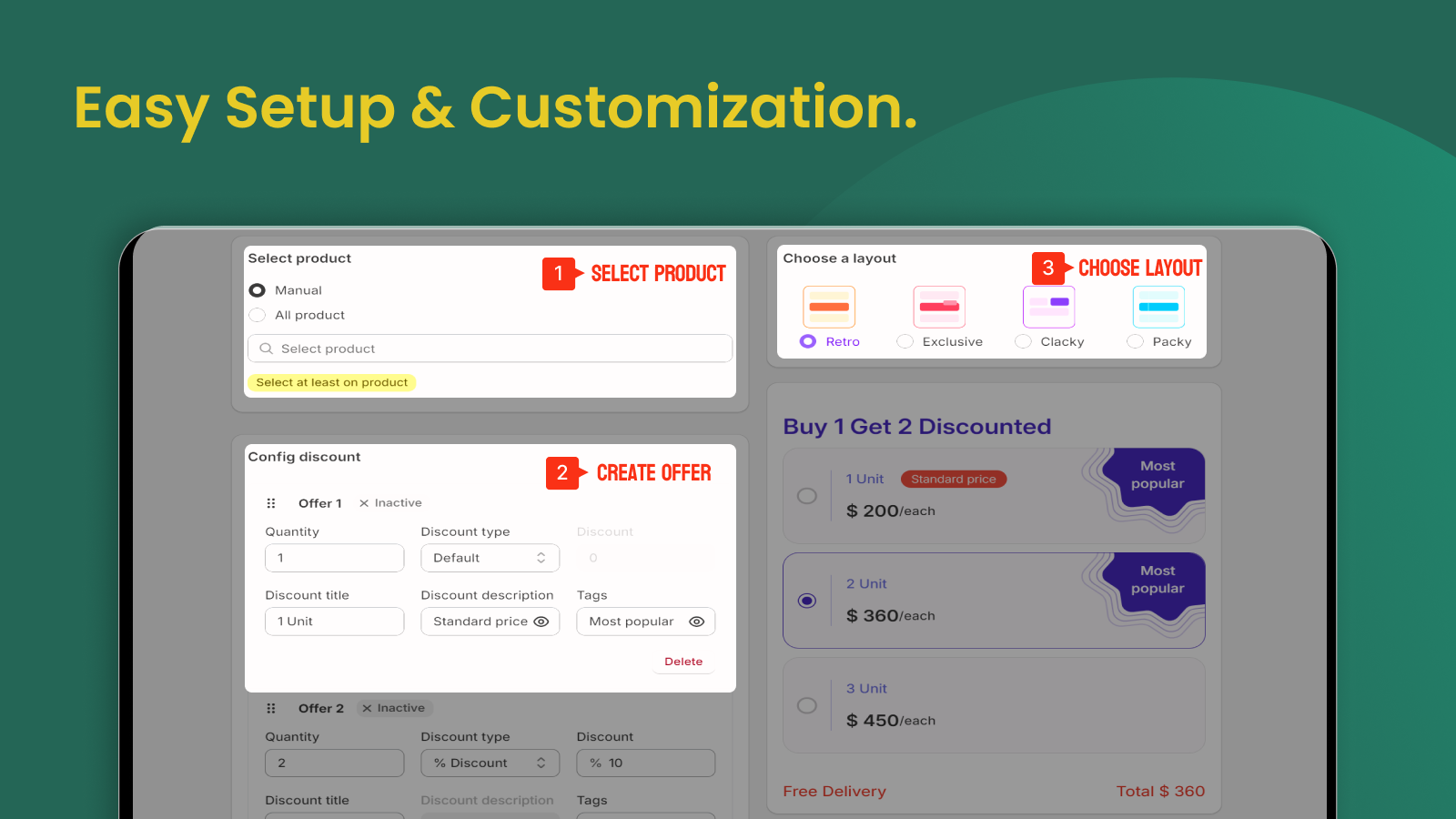
Aris Bundles supports quantity breaks, tiered pricing, volume discounts and multiple bundle formats. Use the configuration to enforce a margin-tested strategy rather than choosing the deepest possible discount.
Measure profit, not only AOV
After launch, compare:
- Conversion rate
- Units per order
- Average order value
- Contribution margin per order
- Shipping cost per unit
- Refund and return rate
- Time to next purchase
If AOV rises while contribution per visitor falls, the offer may be too aggressive. If customers simply shift from a natural three-unit purchase to a discounted three-unit purchase, the tier is subsidizing existing behavior rather than changing it.
Launch your first quantity-break test
Choose one repeat-purchase product, create two meaningful tiers and run the test long enough to cover normal weekly variation. To configure the offer, try Aris Bundles on Shopify, then review profitability before expanding the promotion.
Frequently asked questions
How many quantity-break tiers should I use?
Use the fewest tiers needed to create meaningful choices. Two or three discounted thresholds are usually easier to understand and analyze.
Should higher quantities always get a larger percentage discount?
Not necessarily. The discount should reflect economics and customer value. A capped amount, free shipping or gift may be safer than an ever-deeper percentage.
Can customers mix variants to reach a quantity tier?
Some implementations allow it. Decide whether mixed variants fit inventory and promotion goals, then test the rule before advertising it.